Step into the shop, explore what’s new, and find the prop that feels like coming home.
Use code BF25-10 for $10 off $99 Use code BF25-20 for $20 off $149 Use code BF25-30 for $30 off $199 Use code BF25-50 for $50 off $299 Use code BF25-70 for $70 off $399 Use code BF25-90 for $90 off $499 Use code BF25-110 for $110 off $599 Use code BF25-140 for $140 off $699 Use code BF25-200 for $200 off $$899
Step into the shop, explore what’s new, and find the prop that feels like coming home.
Use code BF25-10 for $10 off $99 Use code BF25-20 for $20 off $149 Use code BF25-30 for $30 off $199 Use code BF25-50 for $50 off $299 Use code BF25-70 for $70 off $399 Use code BF25-90 for $90 off $499 Use code BF25-110 for $110 off $599 Use code BF25-140 for $140 off $699 Use code BF25-200 for $200 off $$899
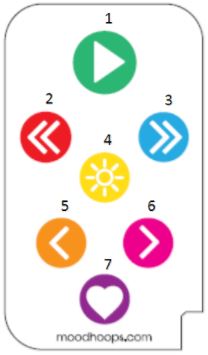
Designer comes with an easy to use 7 key remote control. Use the remote to stop on a pattern, navigate to a different mode, change brightness, and cycle effects.
Autoplay – Press this in time to a beat to set how quickly playback should advance to the next Pattern.
Previous Mode – Navigate to the previous folder, alphabetically
Next Mode – Navigate to the next folder, alphabetically
Brightness – Toggle through three different brightness levels: low, medium, high
Previous Pattern – Navigate to the previous bitmap, alphabetically
Next Pattern – Navigate to the next bitmap, alphabetically
Special – a multi-purpose button. Press to cycle between several different animation speeds. Hold to add the currently playing pattern to Favorites.
Step into the shop, explore what’s new, and find the prop that feels like coming home.
Use code BF25-10 for $10 off $99 Use code BF25-20 for $20 off $149 Use code BF25-30 for $30 off $199 Use code BF25-50 for $50 off $299 Use code BF25-70 for $70 off $399 Use code BF25-90 for $90 off $499 Use code BF25-110 for $110 off $599 Use code BF25-140 for $140 off $699 Use code BF25-200 for $200 off $$899